
UKEY Time
Time tracking without manual timesheets
Employee arrivals and departures are recorded by face recognition, and the timesheet builds itself.
UKEY Time tracks working hours by face: the terminal at the entrance records arrivals and departures, and the timesheet builds itself and exports to Excel and 1C. Launch from 2 working days. Price: from 4,500 som a month for one device up to 20,000 som a month for 10 or more devices. One device covers 25 employees; above the limit, 50 som a month per person. Pay for a year and get 12 months for the price of 10. The terminal and installation are quoted for your site. UKEY Time currently tracks 1,483 employees on 24 terminals (data as of 01.11.2026).
Prices and timelines as of November 2026. Prices exclude the 4% tax.
What is it?
A terminal at the entrance recognizes employees by face and records arrival and departure times. The timesheet builds itself, with no front desk attendant or paper log.
Equipment
Face recognition terminal
The terminal is installed at the entrance. It recognizes employees by face and records arrival and departure times. No access cards or front desk attendant needed.
What it looks like
See who arrived and who was late first thing in the morning
The screen updates automatically: who’s already in, who’s running late, who’s still expected. No need to call department heads or wait for the evening report: discipline issues show up the same day.
Swipe sideways or tap to open
Lateness accurate to the minute
The terminal records arrival times, so the sign-in log at the front desk is no longer needed. Payroll and deductions are calculated from this data: there’s nothing to dispute, and the company doesn’t pay for time not worked.
Swipe sideways or tap to open
One-click timesheet export to Excel, and to 1C without manual uploads
Hours, lateness and absences for any period are calculated automatically, broken down by department. Timesheets for any period export to Excel, and hours worked can be sent to 1C automatically. No more reconciling timesheets by hand every month.
Swipe sideways or tap to open
Daily and weekly summaries arrive by email
At a set time, the manager gets an email: who arrived, who was late, who didn’t show up. A weekly summary arrives every Monday. You can add several recipients, and nobody needs to log in to the system.
Swipe sideways or tap to open
Individual statistics for every employee
Days at work, number of late arrivals and total minutes late, absences and hours worked. The “Top late arrivals”, “Most absences” and “Top overtime” reports are built automatically and export to Excel.
Swipe sideways or tap to open
Temporary access for exactly as long as needed
Contractors, interns or event participants are added as a list, up to 100 people at a time, with an access period. A warning arrives a day before it ends, then access switches off by itself: nobody has to be removed by hand.
Swipe sideways or tap to open
How does it work?
- 01The employee walks up to the terminal
- 02The terminal recognizes their face
- 03Arrival and departure times are recorded automatically
- 04You get a notification for a late arrival or no-show
- 05Data exports to 1C and Excel
Cloud or box
Cloud
- Data in our data center in Bishkek, with daily backups
- Internet is needed on site; terminals resend passes after a connection outage
- Subscription payment, no server of your own
Box
- Data never leaves your network; works without internet
- The box is our mini-server; it connects to the dashboard with one code
- Term license, renewed from the dashboard
What problems does it solve?
Challenges
- Nobody notices late arrivals and early departures
- Manual timesheets take time and contain errors
- The company pays for time not worked
- Managers have to check on employees in person
What your business gets
- Accurate time tracking
- Fewer timesheet errors
- The company doesn’t pay for time not worked
- Late arrivals are visible the same day
- HR and accounting spend less time on timesheets
Before / after
Before
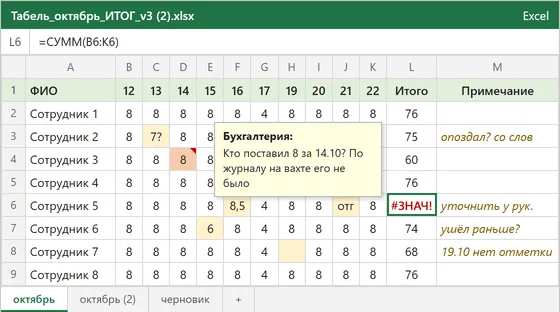
- ✕Timesheets are filled in by hand
- ✕Late arrivals come to light only at the end of the month
- ✕The company pays for time not worked
After
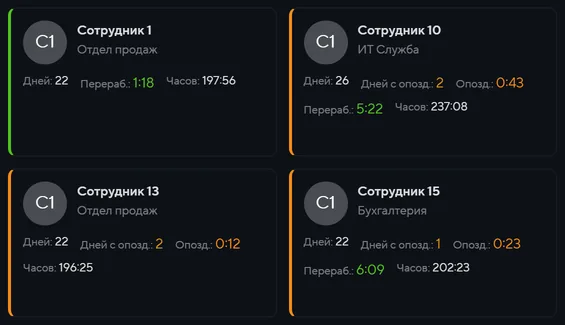
- ✓A face recognition terminal records the time
- ✓Late arrivals are reported instantly
- ✓Timesheets ready for 1C and Excel, no reconciliation needed
Who is it for?
Where it's already in use

How is it implemented?
- 1We survey the entrances and work out how many terminals you need
- 2We install and connect the terminals
- 3We set up export to 1C and Excel
- 4We train HR and launch the system
Recommended reading
Frequently asked questions
Face recognition accuracy is 99.9%.
No. Terminal data exports to 1C and Excel, and your current accounting stays as it is.
The person in charge is notified immediately, with no manual checks needed.
Yes. In strict mode, the system flags lateness and absences; in flexible mode, it only counts hours worked. The mode is set for the whole company or for a specific department.
After a set period, 30 days by default, their photos and recognition data are deleted from the terminals and the system.